


Retyping every tutor’s hours into a spreadsheet? Run payroll with 0 hours retyped.
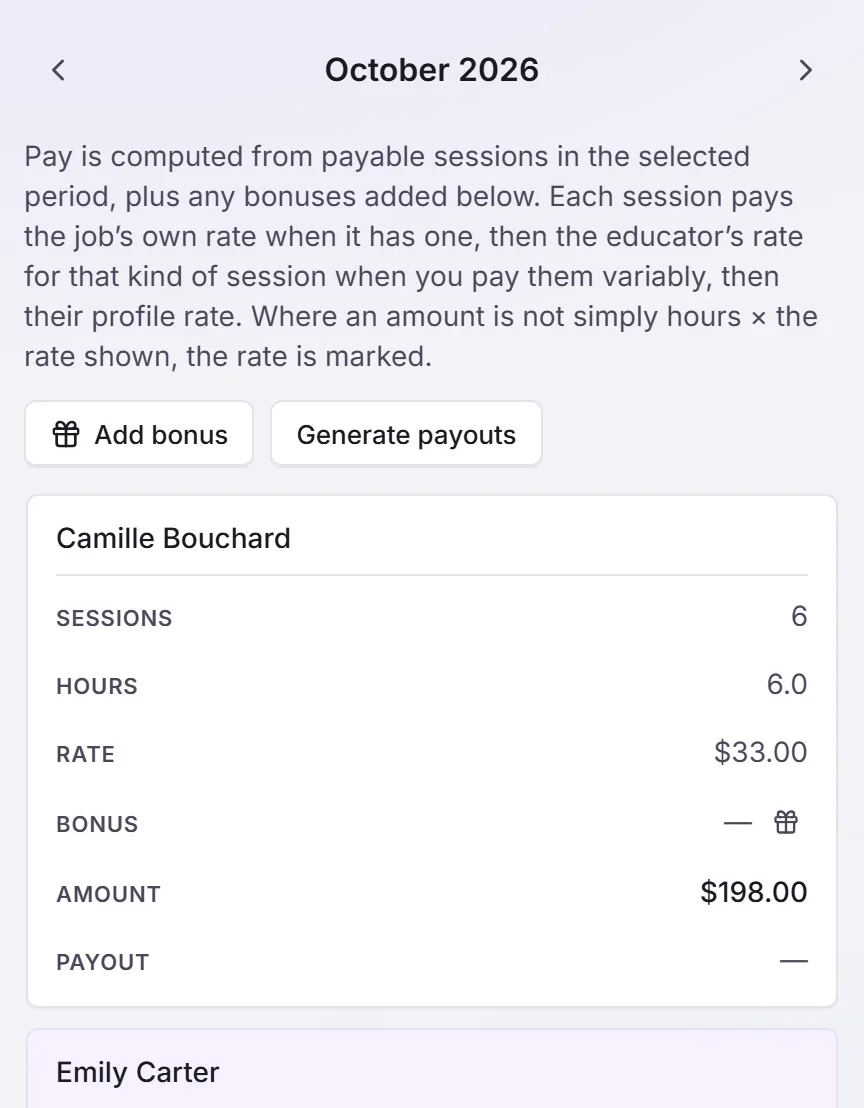
Pay builds from the sessions actually taught: hours, each tutor’s rate, bonuses, 1 line per tutor, and a file for your accountant.
Some of our centres
 Centre de Francisation et de Tutorat au Québec
 Coeur de Tuteur
 Lingua Franca Institute
 Mentors Éducation
 OnCourse Education
 Top Tutorat
 Tuteur Match
 Tutorat au Top
Pay day means retyping every tutor’s hours into a spreadsheet.
You scroll back through two weeks of lessons, tutor by tutor, checking who taught what, at which rate, and which cancellations still get paid. One typo and someone is short. Then your accountant asks for the numbers in a different format.
20 / 172
20 of the 172 public complaints we read about tutoring software are about this.
Three of those complaints, in our words. Each link goes to the source.
A 10-year-old company with 12 tutors runs billing and tutor pay off a shared calendar and homemade spreadsheets.
Pay isn’t calculated from class times, so hours are entered by hand.
Hours and classes can’t be sorted inside the software, so everything goes out to a spreadsheet.
Here’s how Pillar OS handles it
Tutor pay builds itself from the sessions actually taught: hours, rate (or the job’s own rate), bonuses, one line per tutor. Generate payouts freezes the period, and the CSV goes to your accountant. Analytics shows who stays, how busy each tutor is and which programmes carry their weight, and each year families, tutors and the owner get a statement.
Where it is in Pillar OS
- Payroll
- Generate payouts
- Analytics
- Statements
What Pillar OS doesn’t do yet
No margin per student, no custom reports, no profit-and-loss report and no QuickBooks or Xero sync yet.
Good to know
Does Pillar pay the tutors?
No. Pillar works out each tutor’s pay from the lessons taught and gives you the totals and a CSV. You pay them the way you do today.
How much does Pillar OS cost?
One fee set by your active students, in Canadian dollars: $35 a month for up to 50, then by band up to $599 at 1,000. No fee per tutor, per lesson or per family login, and no share of your revenue. Texting, AI use, extra storage, a website, extra locations and the GoHighLevel connection are billed separately, only if you use them.
We use other software or spreadsheets today. How do we move?
On a setup call, we bring your students, families and tutors over from your export or your spreadsheets and book your first sessions with you. Past lessons and invoices stay in your old system’s export, so keep it.
Does it work in French?
Yes. The whole product runs in French or English, for your team and for each family in its own language. GST and QST are calculated on the invoice.
Get your centre running with us, in one call.
About 45 minutes: we load your students and book your first sessions together, in English or French.
