

What a tutoring parent portal should answer for you
The questions parents send a tutoring centre every week, which ones a parent portal can answer on its own, and the conversations that should still come to you.
Some of our centres
 Centre de Francisation et de Tutorat au Québec
 Coeur de Tuteur
 Lingua Franca Institute
 Mentors Éducation
 OnCourse Education
 Top Tutorat
 Tuteur Match
 Tutorat au Top

Most parent emails aren’t really questions about tutoring. They’re questions about information that already exists somewhere in your business, just not anywhere the parent can see it.
When is the next session? Which sessions does this invoice cover? How many are left in the pack we bought in September? Can we move Thursday? Each one takes a minute to answer, and there are a lot of minutes in a week. A good parent portal answers them before they’re sent.
In the 172 public complaints about tutoring software we read, what parents see was the third biggest theme, with 28 complaints. Owners asked for families to be able to message their tutor directly, so that every message stops going through the office, and one request on a vendor’s public board had 104 votes (the request). Parents wanted only their own child’s lessons in their phone calendar (the request). And online booking that families found confusing created more work than it saved (the review).
Sort the questions before you build anything
Before choosing any software, I’d sort the questions you get into two piles. One pile is information a screen can show. The other is a conversation, and it should come to you.
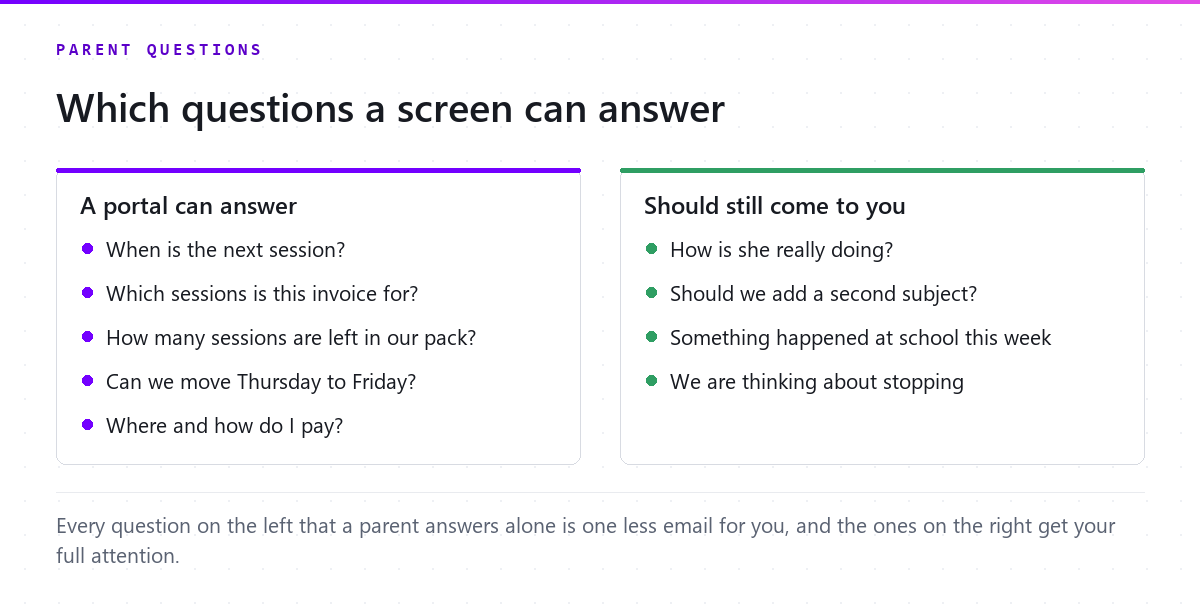
The left pile is where a portal earns its place. Every question there has an answer that already lives in your calendar, your invoices or your package balances. The right pile is why you’re in this business, and a portal should give you more time for it, not replace it.
What a parent portal should show
- Their own child’s schedule, and only theirs, with a calendar feed for their phone.
- Every invoice, line by line, with the sessions it covers and what’s left of any package. An invoice with one line per session answers half the billing questions before they’re asked.
- How to pay, and what’s already been paid.
- Rescheduling within your rules. Families move or cancel where your policy allows it, and the rest still comes to you.
- A way to message the tutor, so the office stops being a switchboard.
None of that is about features for their own sake. It’s about where an answer lives. When the answer lives in your head or your inbox, the parent has to ask, and when it lives on a screen they can see, they don’t.
Information changes what families do
There’s good evidence from schools that regular information to parents changes outcomes, not just inbox volume. In a field experiment, Kraft and Rogers had teachers send short weekly messages to the parents of high school students in a credit-recovery program, and the share of students who failed to earn credit fell from 15.8% to 9.3%. In Los Angeles, Bergman sent parents regular reports on missed assignments and grades, and found that parents had been too optimistic about their children’s effort and that the information improved achievement. Kraft has also written about why that kind of communication stays underused: teachers are rarely given clear expectations, the time or the tools for it.
Those studies are about schools, not tutoring centres, and I won’t pretend they measured your business. But in my opinion the mechanism carries over. Parents who can see what’s happening make better decisions about it, and they trust the people who show them.
What should still come to you
“How is she really doing?” deserves a conversation, not a dashboard. So does “should we add a second subject”, and so does the email that starts with “something happened at school this week”. Those are the moments when a family decides whether to stay, and they’re better handled by a person who knows the child.
A good portal makes those conversations more likely, not less, because you finally have the time for them. If families are drifting away rather than asking, the post on why families drift away from tutoring is the place to start.
Where to start
- Keep a list of every parent question for two weeks, and sort it into the two piles.
- For each question in the left pile, find where the answer already lives.
- Put those answers where parents can see them, starting with the schedule and the invoices.
- Keep the right pile for yourself, and protect the time it needs.
In Pillar OS, families get their own portal: they book by subject, tutor and calendar inside your rules, move or cancel where you allow it, message their tutor, pay their invoices and download their statements. Each child’s lessons can go straight into the parent’s own phone calendar, and families only ever see their own. That’s the tutoring parent portal, and the page on parent questions shows what owners told us.
The best answer to a question a parent asks every week is one they never have to ask.

Steven Kallini · Founder
Mechanical engineer by trade, hooked on computers since he was a kid, and a principal process engineer for 13 years before Pillar OS. That job was finding where a process quietly leaked time and money, then designing the fix. Pillar OS is the same work, aimed at the admin that eats a tutoring owner’s week.
