
Free tutor utilization rate calculator
Your tutors are available more than they teach. See what the gap is worth in 60 seconds.
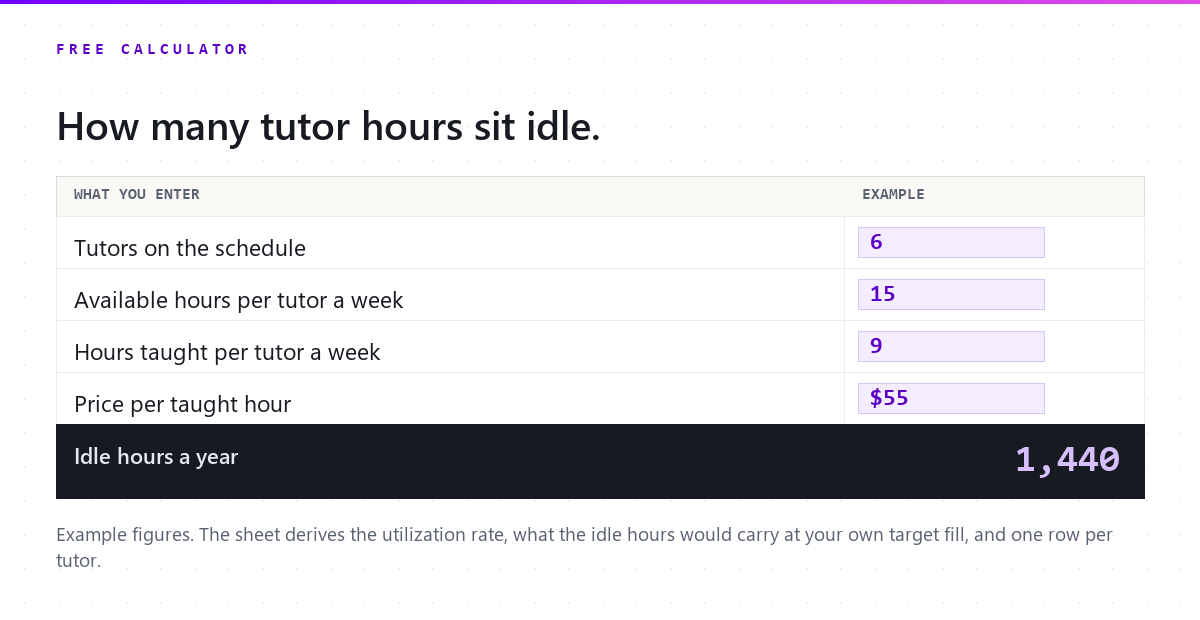
With the example numbers. Change any of them to see yours.
Every figure comes from what you typed: taught hours over available hours, for the team as a whole. What the idle hours "would carry" assumes they were sold at your price; nothing on this page says they will be.
Free download
Get the calculator as a spreadsheet
The same formulas in an XLSX, one row per tutor, so you can run it for each person on the schedule and keep it month to month. One email, then nothing you did not ask for.
What you get
- Download the calculator (.xlsx)
Your file is ready.
It downloads now and a copy is on its way to your inbox. Below: what changes when availability and bookings live in the same place.
What changes with Pillar
Sixty seconds of the real product, no slides.
-
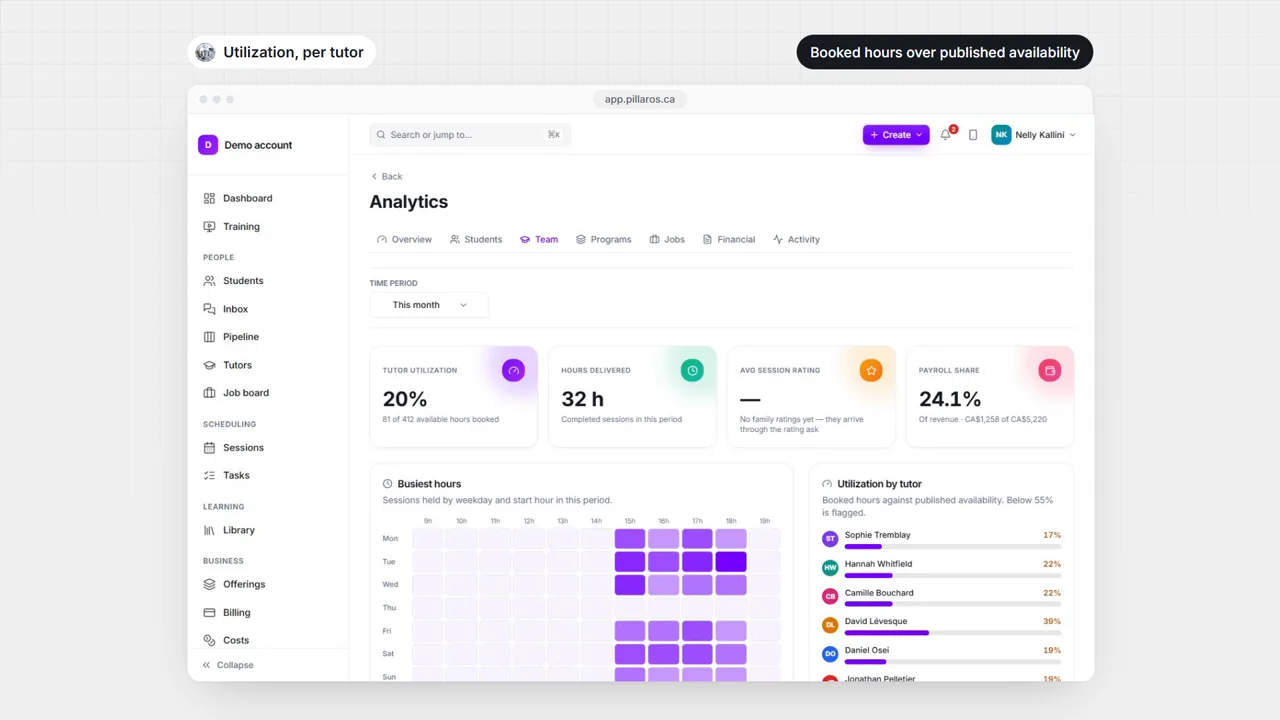
Utilization per tutor lives in the analytics Team tab: booked hours over the hours they published as available, with the trend over the period.
-
Availability gates booking, so the calendar offers a family only the hours a tutor said they can teach, and an idle hour is a real one rather than a data-entry one.
-
Each tutor’s card carries active students, upcoming sessions and hours for the period, so the ones furthest from full are visible without a report.


See it with your own students.
Fourteen days, no card, bilingual, your roster imported. Month to month after that, cancel whenever.
- No card
- English and French
- We import your roster
- Cancel anytime
Questions owners ask before they try it
How does Pillar count available hours?
From the availability each tutor keeps on their own profile, with approved time off taken out, against the sessions booked in the period. For a past period the availability is the template as it stands today, and the analytics page says so plainly instead of pretending to a history it does not have.
How much does Pillar OS cost?
A flat monthly fee set by your active student count: from $35 a month for up to 50 students, rising along a line to $599 at 1,000 students (CAD). No per-tutor fee, no per-lesson fee, no percentage of your revenue. SMS, storage and AI usage are billed separately at cost.
We run on Teachworks, TutorBird or a spreadsheet. How do we move?
Send us your export or your spreadsheets. We move students, families and tutors across and walk the result through with you before you go live. Past lessons and invoices stay in your old system’s export. You can also import a roster yourself from a CSV.
Does it work in French?
Yes. The whole product runs in English or French, for your team and for every family: the portal, invoices, reminders and reports. GST and QST are calculated on the invoice.
Do I need a card to try it?
No. A trial runs 14 days with no card. Start it below: your workspace opens in a minute, you bring your roster and see your own numbers, not sample data.
What about students’ data and Law 25?
Each centre’s data is isolated from every other centre’s, families see only their own students, and the consent a family gives for messages is recorded. Our privacy policy covers PIPEDA and Québec’s Law 25.
Keep reading on this

You cannot calculate last quarter's tutor utilization rate
Utilization is booked hours over available hours, and availability is a setting rather than a history, so every backward looking number is an estimate.

How much to pay tutors, and what a session leaves you
The tutor rate is the biggest line in a tutoring business and the least examined. What one session leaves after pay, payroll costs, card fees and empty chairs.

The tutoring business software stack, explained (2026)
The five jobs your software has to cover, what breaks when one is missing, and how to tell whether your tools or the gaps between them are eating your week.