


Pillar OS is the software tutoring centres use to run their bookings, billing and messages to families. It is made by Kalbot Solutions, in Québec.
When a centre has text messages in its plan, Pillar OS sends that centre’s texts on its behalf, from Pillar’s toll-free number, +1 866 986 7029. A family receives texts only after saying yes. This page shows each way a family says yes and what Pillar keeps as a record of it.
What the texts are
- lesson reminders;
- booking confirmations;
- schedule changes, such as a lesson moved or cancelled; and
- replies from the centre to a message the family sent.
Every text begins with the centre’s name. Pillar sends no marketing or promotional texts.
Texts are off until the family says yes
A new family starts on email only. Texts begin only after one of the three steps below. A family that never says yes gets emails, never texts.
Texts exist only at centres that added text messages to their plan. At every other centre, families receive emails only and none of the steps below appears.
Three ways a family says yes
1. A box on the centre’s public forms
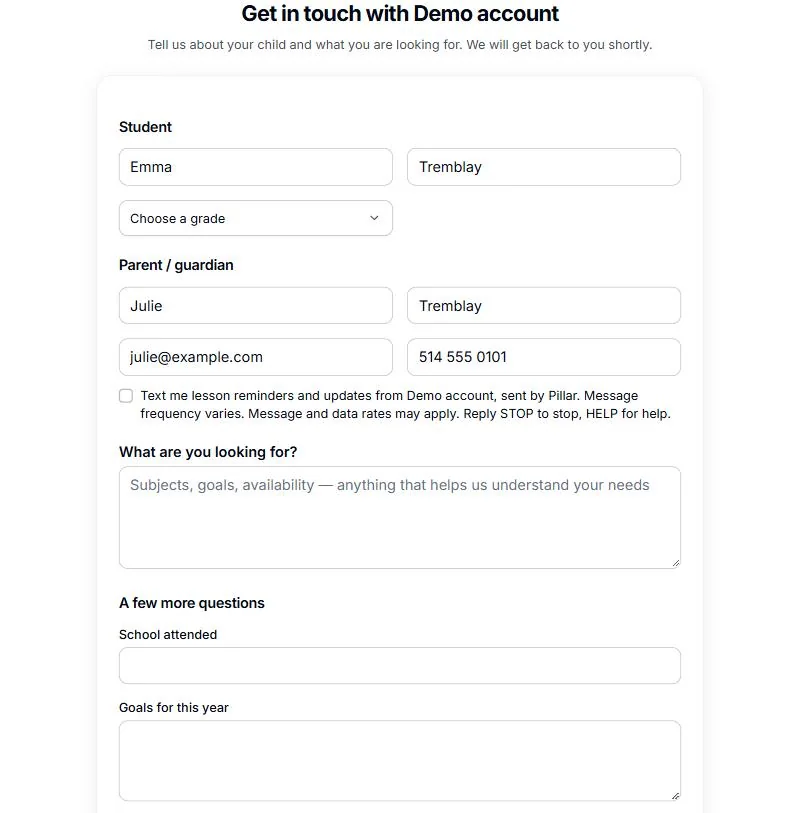
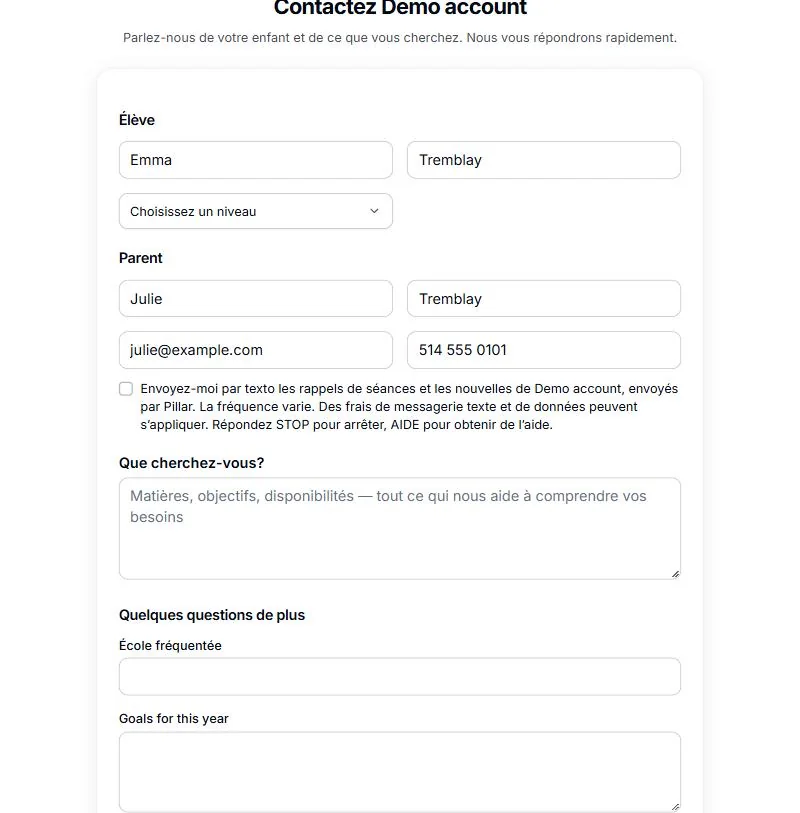
The centre’s registration, enquiry and booking forms ask for a parent’s mobile number. As soon as a number is typed, an unticked box appears right under it. Texts are turned on only if the parent ticks the box and sends the form. Leaving it empty changes nothing: the family stays on email.
The box reads:
“Text me lesson reminders and updates from {centre}, sent by Pillar. Message frequency varies. Message and data rates may apply. Reply STOP to stop, HELP for help.”
{centre} is the name of the centre the family is writing to. A family reading the form in French sees the French wording.
2. The Texts switch in the family portal or the phone app
A parent signed in to the family portal, on the web or in the Pillar phone app, can turn on the Texts switch. It is off for a new family. Beside the switch, the parent reads:
“Lesson reminders and updates from {centre} by text, sent by Pillar. Message frequency varies. Message and data rates may apply. Reply STOP to any text to stop.”
Turning the switch off stops the texts the same way.
3. The centre records a yes given out loud
When a parent says yes in person or on the phone, the centre’s staff tick this box on the family’s record:
“The family agreed to receive texts.”
Pillar OS refuses to turn texts on for a family without that tick.
What Pillar keeps as proof
For every yes, Pillar OS keeps the date and time, how it was given (the form, the portal or app, or the centre’s staff) and the exact words the person saw, in the language they read them. The record is kept with the family’s contact details at their centre.
Stopping, restarting and getting help
- Reply STOP (or ARRÊT) to any text: the texts stop at once, from every centre that uses Pillar’s number. Emails keep coming.
- Reply START to receive texts again.
- Reply HELP (or AIDE) for help.
- Or turn off the Texts switch in the family portal, or ask the centre to turn texts off.
- Message frequency varies with the lessons booked. Message and data rates may apply.
Your mobile number
Mobile numbers and consent to texts are never sold, and never shared with third parties or affiliates for their marketing or promotional purposes. Pillar gives a mobile number only to Twilio, the service that delivers the texts, and only to send them.
The details are in our privacy policy and terms of service.
